I used to subscribe to front page posts RSS feed but gave up on it years ago because the signal-to-noise ratio went too low. Now I subscribe to user RSS feeds of a handful of old-timer users who seem to consistently have interesting things to say and then learn about posts they interact with. https://www.greaterwrong.com/ all the way.
RSS here too. I scroll past a bunch of them, but find gems and I comment where I have something to say.
This is what I do, except I don't look for comments, and I often wait days or weeks before actually reading a post (just kind of depending on when I get around to it).
I use the RSS feed and if it looks interesting I either give a fast look and decide if I read it or not and/or I save those that seem interesting and come back a few hours/days later to see the community reaction and decide then.
Oh, I just recalled the existence of GreaterWrong, an alternative frontend for LessWrong, that includes a recent comments section that might give you what you want: https://www.greaterwrong.com/recentcomments
Yeah, I also use GW, and the recent comments firehose is part of the reason. Very old LW also had it and I loved it then too.
(Another pet complaint of mine is that comment permalinks on current LW work in a very weird way. They show the linked comment at the top of the page, then the post, then the rest of the comments, including a second copy of the linked comment. I don't know what design process led to this, but even after all these years it throws me off every time. Reddit and HN also get it wrong, but less wrong than LW: they show the comment and its subthread, but not the surrounding context. GW is the only one that gets it right: it links to the entire comment page, and jumps to the comment in question.)

I don't know what design process led to this, but even after all these years it throws me off every time.
One of the reasons is search indexing. Another reason is that scrolling precisely to a position in a comment tree is just very hard. Users scroll before the full page is loaded, and whenever I do user interviews with the in-context link version people fail to actually identify what comment they were linked to like 30% of the time. I think there probably must be some clever and good UI solution, but I haven't found one after a few dozen hours of trying.
GW deals with this by blocking scrolling and blanking out the page until the relevant anchor tag has loaded.
You could try it on HN: go to any user's comments page, choose any comment and click its "context" link. It'll load the page and jump to the right place. To experience the "scroll before load" problem you'll have to work pretty hard. And it's plain old server side rendering, with an SPA you have strictly more control, you can even blink the page into existence scrolled to the right place. And if you want even more clarity, you can highlight the linked-to comment.
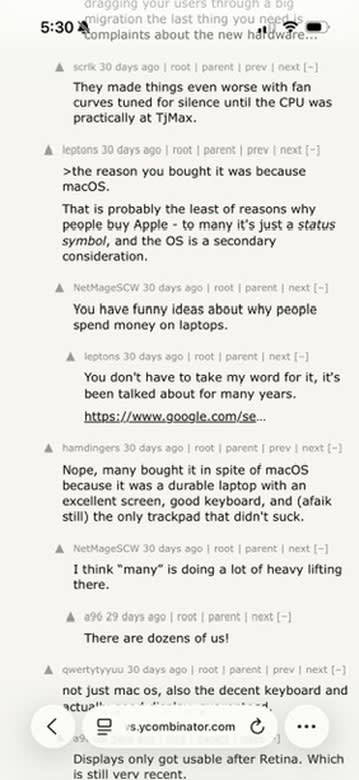
It does indeed work pretty well on desktop. However, doing this on my Iphone produced the following result screen:
I could not confidently tell you which comment I was supposed to be linked to. All three visible comments at the top of the screen strike me as candidates.
Does the viewport at least contain the target comment? If yes, maybe highlighting it would solve the rest of the problem? (And it might help on desktop too, if the target comment is near the bottom of the page and we can't scroll far enough to line it up with top of screen.)
Yeah, the correct one is the one by "scrik" at the top of the page.
Agree that highlighting might fix it, but it's surprisingly tricky to find a way to highlight it that people will interpret as "this is the comment that you were linked to".
I overall agree it's all somehow probably doable, but I have struggled with making something that actually works without spending a lot of time on it.
Reddit and HN also get it wrong, but less wrong than LW: they show the comment and its subthread, but not the surrounding context.
You can click on the "context" link in a HN subthread view to switch to the one you want.
My method of reading Less Wrong is to scroll back through all recent comments and posts, which the front page spontaneously presents to me in reverse-chronological order, until I arrive at posts and comments that I recognize. Along the way, if I see anything that I might want to read at length, I open it into a new browser tab.
It seems that this is no longer an option. I can keep up with all the new posts via "All Posts", but the comment feed is now a mix of actually recent comments mingled with recommended content from years in the past, with the actually recent comments also appearing out of temporal order.
I would therefore like to know how other people engage with the site. What is the process by which you find out what's new, and how do you decide what content to read?